Zaak Afhandel App — Comprehensive Page Review
App version: 0.1.29 Reviewed: 2026-02-26 Environment: Nextcloud on localhost:8080, admin:admin
Overview
The Zaak Afhandel App (ZAA) is a Dutch-language case management application for Nextcloud. It serves as the precursor to the Procest app. The app follows a consistent three-panel Nextcloud layout: left sidebar navigation, main content area, and optional right sidebar (on some pages).
All entity pages currently show empty states (no data configured). The app uses ZGW (Zaakgericht Werken) terminology throughout.
Global Navigation
The left sidebar is consistent across all pages and contains:
| Element | Type | Description |
|---|---|---|
| Zaak Starten | Primary button (top) | Opens the Zaak creation modal |
| Dashboard | Nav link | /apps/zaakafhandelapp/ |
| Zaken | Nav link | /apps/zaakafhandelapp/zaken |
| Taken | Nav link | /apps/zaakafhandelapp/taken |
| Klanten | Nav link | /apps/zaakafhandelapp/klanten |
| Medewerkers | Nav link | /apps/zaakafhandelapp/medewerkers |
| Contact momenten | Nav link | /apps/zaakafhandelapp/contactmomenten |
| Berichten | Nav link | /apps/zaakafhandelapp/berichten |
| Rollen | Nav link | /apps/zaakafhandelapp/rollen |
| Zoeken | Nav link | /apps/zaakafhandelapp/zoeken |
| Instellingen | Expandable button (bottom) | Reveals: Zaak Typen, Audit trail, Configuration |
1. Dashboard
URL: /apps/zaakafhandelapp/
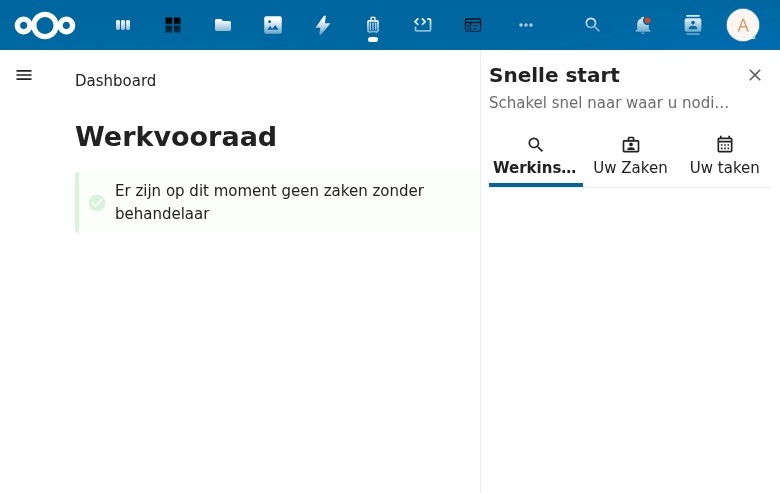
Layout
- Main area: Shows "Dashboard" heading, "Werkvooraad" (Work queue) section
- Right sidebar: "Snelle start" (Quick start) panel with tabs
Main Content
- Heading: "Dashboard" (h1) + "Werkvooraad" (h2)
- Info notice: Green checkmark icon with message: "Er zijn op dit moment geen zaken zonder behandelaar" (There are currently no cases without a handler)
- No KPIs, charts, or statistics visible — just the work queue message
Right Sidebar — "Snelle start"
- Title: "Snelle start" (Quick start)
- Subtitle: "Schakel snel naar waar u nodig bent" (Switch quickly to where you need to be)
- Close button (X) to dismiss sidebar
- Three tabs:
- Werkinstructies (Work instructions) — Selected by default, shows heading only, no content
- Uw Zaken (Your Cases) — Empty
- Uw taken (Your tasks) — Empty
Observations
- Dashboard is minimal — only shows unassigned cases queue
- No KPI cards, no status charts, no activity feed
- The "Snelle start" sidebar is a useful concept but has no content when empty
- The "Werkvooraad" concept (work queue for unassigned cases) is a good UX pattern
2. Zaken (Cases)
URL: /apps/zaakafhandelapp/zaken
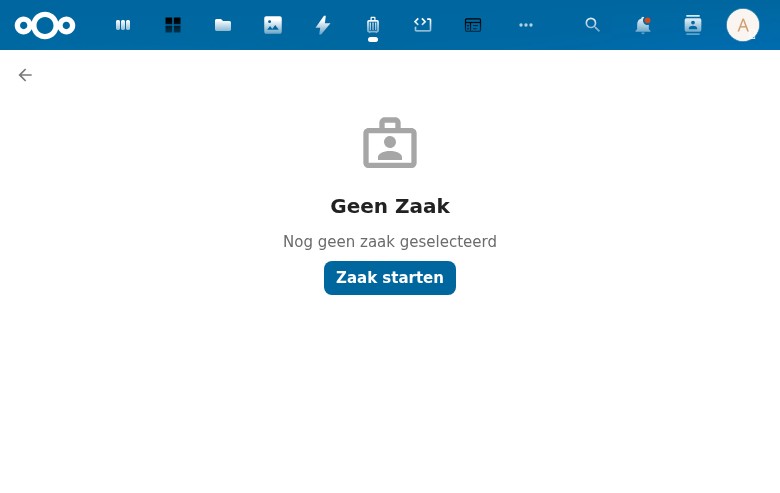
Layout
- Back button (arrow) in top-left
- Empty state centered in main content area
- No right sidebar
Empty State
- Icon: Person/case icon (gray)
- Title: "Geen Zaak" (No Case)
- Description: "Nog geen zaak geselecteerd" (No case selected yet)
- CTA button: "Zaak starten" (Start case) — primary blue button
Observations
- Uses a list/detail split layout pattern — the left panel (hidden when no items) would show a list, the right panel shows the detail
- The empty state text says "no case selected" rather than "no cases exist", suggesting this is a selection prompt
- "Zaak starten" button opens the create modal (same as sidebar button)
3. Taken (Tasks)
URL: /apps/zaakafhandelapp/taken
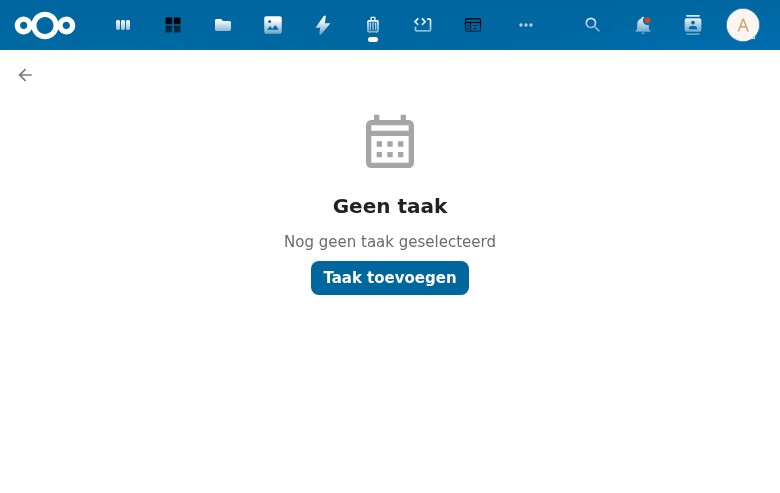
Layout
- Identical layout pattern to Zaken
- Back button, empty state, no right sidebar
Empty State
- Icon: Calendar/grid icon (gray)
- Title: "Geen taak" (No task)
- Description: "Nog geen taak geselecteerd" (No task selected yet)
- CTA button: "Taak toevoegen" (Add task)
Observations
- Different icon from Zaken page (calendar vs person)
- Same list/detail pattern
- "Toevoegen" (add) vs "starten" (start) — different verbs used for different entity types
4. Klanten (Customers)
URL: /apps/zaakafhandelapp/klanten
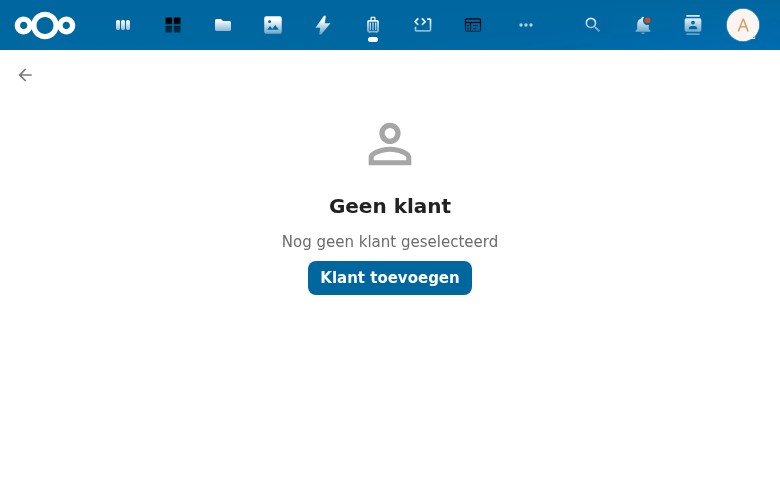
Empty State
- Icon: Person outline icon (gray)
- Title: "Geen klant" (No customer)
- Description: "Nog geen klant geselecteerd" (No customer selected yet)
- CTA button: "Klant toevoegen" (Add customer)
Observations
- Same layout pattern as all entity pages
- Represents the citizen/customer in the case management context
5. Medewerkers (Employees)
URL: /apps/zaakafhandelapp/medewerkers
Empty State
- Icon: Person outline icon (slightly different from Klanten — no border on head)
- Title: "Geen medewerker" (No employee)
- Description: "Nog geen medewerker geselecteerd" (No employee selected yet)
- CTA button: "Medewerker toevoegen" (Add employee)
Observations
- Separate entity from Nextcloud users — represents employees in the organizational context
- Same pattern, different icon to distinguish from Klanten
6. Contact momenten (Contact Moments)
URL: /apps/zaakafhandelapp/contactmomenten
Empty State
- Icon: Person with badge/card icon (gray, more detailed)
- Title: "Geen contact moment" (No contact moment)
- Description: "Nog geen contact moment geselecteerd" (No contact moment selected yet)
- CTA button: "Contact moment aanmaken" (Create contact moment)
Observations
- ZGW concept: records of interactions with citizens
- Button uses "aanmaken" (create) rather than "toevoegen" (add)
- Different verbs for different entities: starten (cases), toevoegen (tasks/customers/employees), aanmaken (contact moments/messages)
7. Berichten (Messages)
URL: /apps/zaakafhandelapp/berichten
Empty State
- Icon: Speech bubble icon (gray)
- Title: "Geen bericht" (No message)
- Description: "Nog geen bericht geselecteerd" (No message selected yet)
- CTA button: "Bericht aanmaken" (Create message)
Observations
- Communication/messaging functionality
- Uses "aanmaken" verb like Contact momenten
8. Rollen (Roles)
URL: /apps/zaakafhandelapp/rollen
Empty State
- Icon: Person with briefcase icon (gray)
- Title: "Geen Rol" (No Role)
- Description: "Nog geen rol geselecteerd" (No role selected yet)
- CTA button: "Rol starten" (Start role)
Observations
- ZGW concept: roles define the relationship between a person and a case
- Uses "starten" verb like Zaken, suggesting a role is something you initiate
- Capitalization inconsistency: "Geen Rol" vs "Geen taak" — mixed casing
9. Zoeken (Search)
URL: /apps/zaakafhandelapp/zoeken
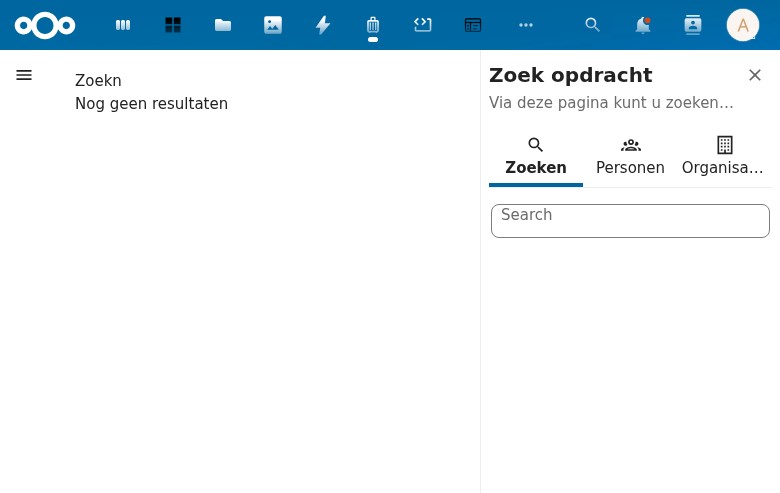
Layout
- Main area: Search results (currently empty)
- Right sidebar: "Zoek opdracht" (Search query) panel with tabs
- Hamburger menu visible in top-left (sidebar collapsed)
Main Content
- Heading: "Zoekn" (h1) — TYPO: should be "Zoeken"
- Message: "Nog geen resultaten" (No results yet)
Right Sidebar — "Zoek opdracht"
- Title: "Zoek opdracht" (Search query)
- Subtitle: "Via deze pagina kunt u zoeken binnen uw gemeente" (Via this page you can search within your municipality)
- Three tabs:
- Zoeken (Search) — Selected by default, contains a text search field
- Personen (Persons) — For person-specific search
- Organisaties (Organizations) — For organization-specific search
Console Errors
Failed to load resource: /api/klanten— API returns HTML instead of JSON (500 error)
Observations
- Bug: Typo in heading "Zoekn" should be "Zoeken"
- Bug: API errors when loading the search page (klanten endpoint returns 500)
- The search sidebar with tabs for different entity types is a good UX pattern
- Municipality-oriented ("gemeente") — confirms this is for Dutch government use
10. Instellingen — Zaak Typen (Settings — Case Types)
URL: /apps/zaakafhandelapp/zaaktypen
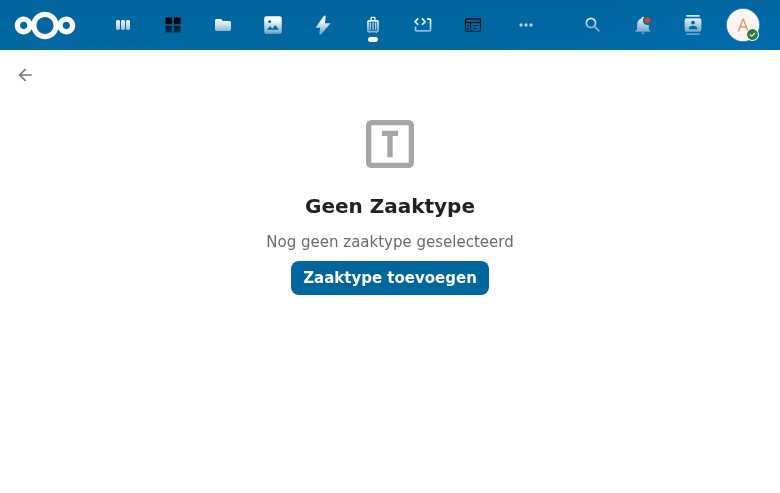
Layout
- Back button in top-left
- Full-page empty state (no sidebar navigation visible)
- Multiple console errors (CSS/JS resource loading failures)
Empty State
- Icon: Letter "T" in a box (gray)
- Title: "Geen Zaaktype" (No Case Type)
- Description: "Nog geen zaaktype geselecteerd" (No case type selected yet)
- CTA button: "Zaaktype toevoegen" (Add case type)
Console Errors
- Refused to apply styles and execute scripts — likely CSP (Content Security Policy) issues
TypeError: Failed to fetch— API connectivity problems
Observations
- Case types are the foundation of the ZGW model — cases must have a type
- The page loads but with significant resource errors
- Without case types, the "Zaak Starten" functionality cannot work properly
11. Instellingen — Audit Trail
URL: /apps/zaakafhandelapp/auditTrail
Status: 404 — Page not found
Observations
- The sidebar navigation has a link to this page, but the route is not registered in the backend
- The URL uses camelCase (
auditTrail) which may be a routing configuration issue - Bug: Dead link in navigation — leads to Nextcloud's 404 page
12. Instellingen — Configuration
URL: Not determined (sidebar link uses #)
Status: Navigation item present but link is # (no-op)
Observations
- The Configuration link in the sidebar doesn't navigate anywhere
- It appears to be a placeholder or unimplemented feature
Modals
Zaak Aanmaken (Create Case)
Trigger: "Zaak starten" button (sidebar or Zaken page)
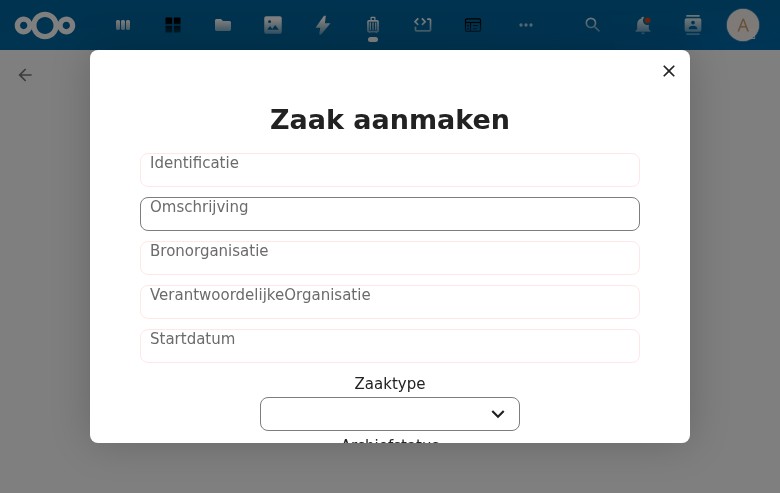
Fields
| Field | Type | Required | Notes |
|---|---|---|---|
| Identificatie | Text input | ? | Case identifier |
| Omschrijving | Text input | ? | Description |
| Bronorganisatie | Text input | ? | Source organization |
| VerantwoordelijkeOrganisatie | Text input | ? | Responsible organization |
| Startdatum | Text input | ? | Start date (plain text, no date picker) |
| Zaaktype | Combobox/dropdown | ? | Case type selection — loads from API (fails with 500) |
| Archiefstatus | Combobox/dropdown | ? | Archive status |
| Uiterlijke Einddatum Afdoening | Date picker | ? | Ultimate completion deadline |
| Registratiedatum | Text input | ? | Registration date |
| Toelichting | Text input | ? | Explanation/notes |
Buttons
- Aanmaken (Create) — Disabled (grayed out), presumably needs required fields
Observations
- ZGW-compliant field names (Dutch government standard)
- "Startdatum" is a plain text field instead of a date picker — inconsistent with "Uiterlijke Einddatum Afdoening" which does have a date picker
- "VerantwoordelijkeOrganisatie" is displayed without spaces — poor label formatting
- The "Aanmaken" button is disabled, likely because Zaaktype dropdown fails to load options (API 500 error)
- No visible validation messages or required field indicators
- No "Annuleer" (Cancel) button — only the X close button
Taak (Create Task)
Trigger: "Taak toevoegen" button (Taken page)
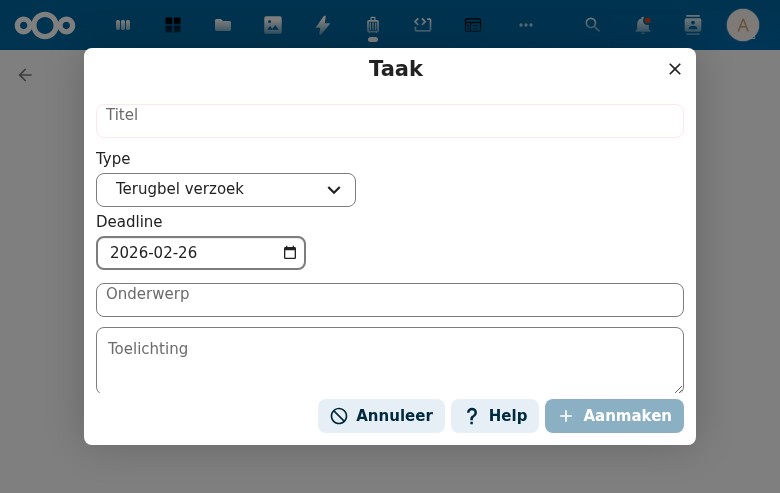
Fields
| Field | Type | Default | Notes |
|---|---|---|---|
| Titel | Text input | — | Task title |
| Type | Combobox/dropdown | "Terugbel verzoek" | Task type (callback request) |
| Deadline | Date picker | Current date (2026-02-26) | With calendar icon |
| Onderwerp | Text input | — | Subject |
| Toelichting | Textarea | — | Explanation/notes (multiline) |
| Klant / Medewerker | Checkbox toggle | Unchecked | Toggles Klant dropdown |
| Klant* | Combobox/dropdown | — | Customer selection (shown when checkbox is checked) |
Buttons
- Annuleer (Cancel) — with prohibition icon
- Help — with question mark icon
- Aanmaken (Create) — Disabled, with plus icon
Observations
- Better UX than the Zaak modal — has Cancel and Help buttons
- Default task type "Terugbel verzoek" (callback request) suggests common use case
- Deadline auto-fills with today's date — good default
- The Klant/Medewerker checkbox toggle is a nice conditional field pattern
- API errors when loading: klanten and contactmomenten endpoints return 500
- "Klant*" with asterisk suggests required when visible, but no other fields show required indicators
Cross-Cutting Observations
UI Patterns
- Consistent empty states: Every entity page uses the same pattern: icon + "Geen [entity]" + description + CTA button
- Three-panel layout: Sidebar nav (left), main content (center), optional detail sidebar (right)
- Nextcloud Vue components: Uses standard NcButton, NcAppNavigation, NcModal components
- Dutch-only: No internationalization visible — all strings are hardcoded in Dutch
Bugs Found
| # | Severity | Page | Issue |
|---|---|---|---|
| 1 | Medium | Zoeken | Typo: "Zoekn" should be "Zoeken" |
| 2 | High | Multiple | API endpoints return 500 errors (klanten, zaaktypen, contactmomenten) |
| 3 | Medium | Audit Trail | 404 — route not registered but linked in navigation |
| 4 | Low | Configuration | Dead link (#) in navigation |
| 5 | Medium | Zaak modal | Startdatum is plain text instead of date picker |
| 6 | Low | Zaak modal | "VerantwoordelijkeOrganisatie" label has no spaces |
| 7 | Low | Various | Inconsistent capitalization: "Geen Rol" vs "Geen taak" |
| 8 | Low | Various | Inconsistent button verbs: starten/toevoegen/aanmaken |
Architecture Notes
- ZGW-aligned: Uses standard Dutch government case management terminology (Zaak, Zaaktype, Rol, Contactmoment)
- API layer: Appears to proxy to external ZGW APIs (
/api/ztc/zaaktypen,/api/klanten) - Vue 2 + Nextcloud Vue: Standard Nextcloud frontend stack
- Entity types: 8 main entities (Zaken, Taken, Klanten, Medewerkers, Contact momenten, Berichten, Rollen, Zaak Typen)
- Search: Separate search page with tabbed search by entity type (Personen, Organisaties)
Feature Comparison with Procest
| Feature | ZAA (this app) | Procest |
|---|---|---|
| Dashboard | Minimal (work queue only) | KPIs, status chart, overdue panel, activity feed, my work |
| Case creation | Modal with ZGW fields | Modal with configurable case types |
| Tasks | Basic modal (type, deadline) | BPMN lifecycle (available/active/completed) |
| Navigation | 10 entity pages | Simplified (Dashboard, Cases, Tasks, Settings) |
| Search | Dedicated page with tabs | Integrated list filtering |
| Settings | Zaak Typen + broken pages | Case types, status types configuration |
| API model | ZGW proxy (external APIs) | OpenRegister (internal storage) |
| Language | Dutch only | Internationalized (t() function) |
| Status tracking | Not visible | Status timeline, quick status dropdown |
| Overdue handling | Not visible | Deadline panel, overdue indicators |